Diagrams, math and code
Mermaid diagrams and TeX formulas drawn from their source as you type, and code blocks coloured by their language.
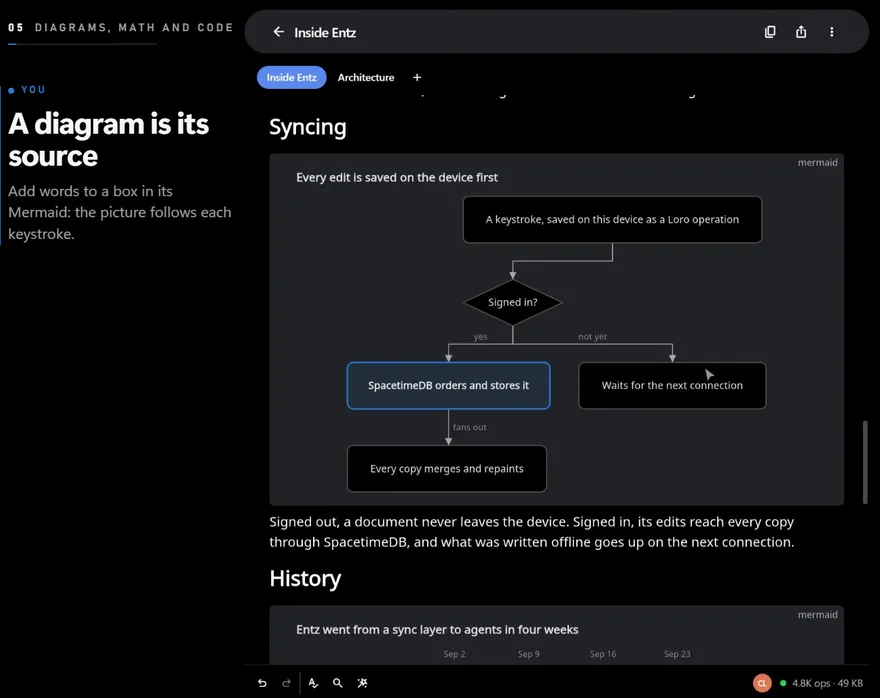
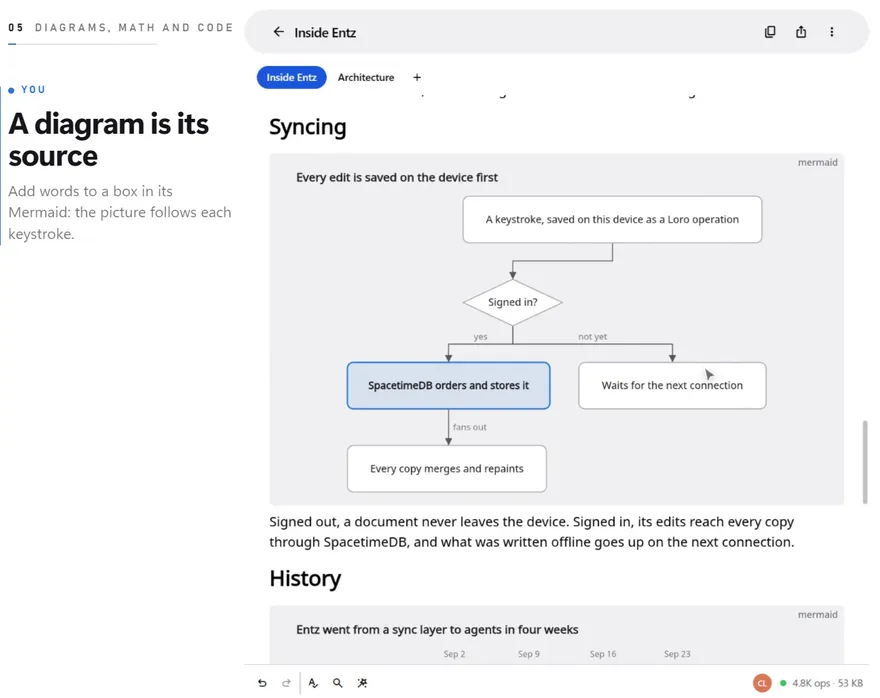
Diagrams and formulas are code blocks whose language says what to draw: mermaid for a diagram, latex for a formula. The source stays text, so it syncs, merges and exports like the rest of the document, and every device draws the picture from it.
Code blocks
Section titled “Code blocks”Make a code block with Code block in the slash menu, with Ctrl+Shift+K (Cmd+Shift+K on macOS), or by typing three backticks at the start of a paragraph, then a space or Enter. A language name after the backticks (```python) sets the block’s language (Writing and formatting).
Inside a code block:
Enterstarts a new line in the block, andTabtypes a tab.Ctrl+Enter(Cmd+Enteron macOS) splits the block at the caret. At its end, that starts an empty code block below, whichCtrl+0orBackspaceturns into a paragraph: the way to carry on writing after code at the end of a document.Ctrl+A(Cmd+Aon macOS) selects the block’s code; a second press selects the whole document. A drag that starts in a code block stays in it.- The status bar shows the caret’s line and column, as in
Ln 3, Col 12. - The selection menu offers no marks there, since code has none in Markdown.
The block’s language shows in its top-right corner, and an outline marks the block while the caret is in it.
The language menu
Section titled “The language menu”While the caret is in a code block, its tools sit above its top-right corner: the language menu, which shows the block’s language, then Copy the code, which copies the source without the fence. The menu offers Plain text, JavaScript, TypeScript, Rust, Python, Go, JSON, HTML, CSS, Shell, SQL, Markdown, Mermaid diagram, LaTeX formula, Swift, Kotlin, C, C++ and Java. A language typed after the backticks that the menu does not list is kept, and the menu shows its name.
Syntax colours
Section titled “Syntax colours”| Language | Its names | Coloured |
|---|---|---|
| Rust | rust, rs |
Keywords, strings, numbers, comments |
| JavaScript, TypeScript | javascript, js, jsx, typescript, ts, tsx |
Keywords, strings, numbers, comments |
| Python | python, py |
Keywords, strings, numbers, comments |
| Go | go, golang |
Keywords, strings, numbers, comments |
| C, C++, C#, Objective-C, Swift | c, h, cpp, c++, hpp, cs, csharp, objc, swift |
Keywords, strings, numbers, comments |
| Java, Kotlin, Scala | java, kotlin, kt, scala |
Keywords, strings, numbers, comments |
| Shell | shell, sh, bash, zsh, fish |
Keywords, strings, numbers, comments |
| SQL | sql, postgres, mysql, sqlite |
Keywords, strings, numbers, comments |
| CSS | css, scss, less |
Keywords, strings, numbers, comments |
| Ruby | ruby, rb |
Keywords, strings, numbers, comments |
| JSON | json, jsonc |
Strings, numbers, true, false, null, comments |
| HTML, XML, SVG, Vue | html, xml, svg, vue |
Strings, numbers, <!-- --> comments |
| TOML, YAML, INI, Dockerfile, Makefile | toml, yaml, yml, ini, dockerfile, makefile |
Strings, numbers, # comments |
| Mermaid | mermaid, mmd |
Diagram types and structure words, strings, %% comments |
| LaTeX | latex, tex |
Commands such as \frac, numbers, % comments |
| Plain text, Markdown | no name, text, markdown, md |
Numbers only |
| Anything else | any other name | Strings, numbers, // and /* */ comments |
Mermaid diagrams
Section titled “Mermaid diagrams”Make a diagram with Diagram in the slash menu (also found by typing mermaid, flowchart, chart or graph), by typing ```mermaid then a space or Enter at the start of a paragraph, or by choosing Mermaid diagram in a code block’s language menu. Markdown with a mermaid fence, pasted or imported, arrives as a diagram too, and mmd works as the language as well.
Editing a diagram
Section titled “Editing a diagram”The block keeps one size whether or not the caret is in it, so the page never jumps:
- With the caret elsewhere, the diagram shows alone, centred, and scaled down to the width of the text when it is wider (never up).
- With the caret inside, the diagram fades and its source shows over it. A source longer than the diagram scrolls inside the box, and the mouse wheel scrolls the box before the page.
- A click on a diagram puts the caret in its source.
Every keystroke draws the diagram again. A slow diagram, one that took 30 milliseconds or more to draw, keeps its last picture while you type and is drawn again a quarter of a second after you stop. A source that draws nothing shows the parser’s first message in its place, and an empty block shows a hint. On the web, the first diagram or formula after the page loads says “Loading the diagram engine” for a moment.
While the caret is in a diagram, Download the diagram as an image among the block’s tools saves it as a PNG file, on the web.
What it draws
Section titled “What it draws”| Diagram | The line that names it |
|---|---|
| Flowchart | flowchart TD or graph LR |
| Sequence diagram | sequenceDiagram |
| Class diagram | classDiagram |
| State diagram | stateDiagram-v2 |
| Entity relationship diagram | erDiagram |
| Gantt chart | gantt |
| Pie chart | pie |
| Mind map | mindmap |
| Git graph | gitGraph |
| User journey | journey |
| Requirement diagram | requirementDiagram |
| Timeline | timeline |
| Quadrant chart | quadrantChart |
| Sankey diagram | sankey-beta |
| XY chart | xychart-beta |
| Block diagram | block-beta |
| Packet diagram | packet-beta |
| Architecture diagram | architecture-beta |
| C4 diagrams | C4Context, C4Container, C4Component, C4Dynamic, C4Deployment |
| Kanban board | kanban |
| Treemap | treemap |
| Radar chart | radar-beta |
Boxes have rounded corners and Mermaid’s own spacing, labels on a flowchart’s or state diagram’s arrows sit as quiet words beside their lines, and an arrow that closes a loop is routed around the boxes between its ends. A title: in the source’s front matter is drawn above the diagram. Greys follow the theme, so a diagram reads in dark mode too; other colours stay as the source sets them.
One box can stand out: give it a colour with style or a classDef, and it gets a border in that colour, a light tint of it and a heavier label.
---title: Reviews loop back until approved---flowchart TD Draft --> Review Review -->|approved| Ship Review -->|changes| Draft style Ship stroke:#2563ebCharts
Section titled “Charts”XY charts, pie charts, quadrant charts, Gantt charts and timelines are drawn in greys with one blue accent, and the title in a heavier weight. The accent goes where the source puts it: on a Gantt task tagged active, or on a quadrant point given a color:. A Gantt chart is drawn this way when its dates are written YYYY-MM-DD; with another dateFormat it gets a plainer drawing.
gantt title Relaunch plan dateFormat YYYY-MM-DD section Build Beta program :a1, 2026-10-06, 14d Feature freeze :milestone, 2026-10-20, 0d section Launch Support :after a1, 6d Launch day :milestone, active, 2026-11-10, 0dLimits worth knowing
Section titled “Limits worth knowing”- Subgraphs can be drawn overlapping one another; a flowchart without them lays out cleanly.
- A long label on a branching arrow can be crossed by the line beside it, so keep arrow labels short.
- A long left-to-right flow is scaled down to fit the column. Top to bottom (
flowchart TD) keeps the words larger. - Sequence diagrams are drawn in part: some of Mermaid’s sequence features are missing.
Formula blocks
Section titled “Formula blocks”Make a formula with Formula in the slash menu (also found by typing latex, tex, math or equation), by typing ```latex then a space or Enter, or by choosing LaTeX formula in a code block’s language menu. Write TeX as KaTeX reads it:
\int_0^1 x^2\,dx = \frac{1}{3}A formula block behaves as a diagram does: the formula alone while the caret is elsewhere, the source over it while you edit, and a hint in an empty block. A source that does not parse shows the parser’s message instead. The formula is drawn at 1.2 times the size of the text. Black in it takes the theme’s text colour, so it reads in dark mode, while \color keeps the colour you ask for. A character that no math font has, such as a Chinese character or an emoji, is drawn in the editor’s own font. Download the formula as an image saves it as a PNG file, on the web.
Formulas from Markdown
Section titled “Formulas from Markdown”Markdown has two forms of math, and both arrive typeset:
$$ … $$is a display formula: a block of its own that behaves like a formula block.$…$inside a line is an inline formula, typeset in the line at the size of the text. While the caret touches it, or when it does not parse, it shows its source.
They come in with a Markdown file you import, a paste that reads as Markdown, and the words the assistant or an agent writes. The app has no control that turns selected words into a formula.
Export
Section titled “Export”Markdown keeps the source: a mermaid or latex fence, $$ for a display formula and $ for an inline one. HTML writes the source as text, marked with what it is, so a page can draw it with Mermaid or KaTeX of its own. For a picture of one diagram or formula, use its download button. Import and export covers the formats.